
If you are setting up a TurboLamik TCU, there are three file types that are essential to understand: the BIN file, the XDF file, and the ADX file. Here is a breakdown of what each one does and how they work together.
Written by Andrew Astley of 8speed.com.au and published with permission.
In this article: What Is a BIN File? | What Is an XDF File? | What Is an ADX File? | Summary
What Is a BIN File?
A BIN file is a binary file that contains the actual calibration data used by a vehicle's ECU or TCU. It is the file that tuners edit using TunerPro to change how the engine or transmission behaves.
The raw data inside a BIN file defines parameters such as:
- Shift maps
- Converter lockup
- Minimum and maximum RPM points
- Torque calculation
- Input calibration
On its own, a BIN file is just a collection of raw hex values with no labels or context. It needs to be paired with an XDF file inside TunerPro before those values can be understood and edited in a meaningful way.
What Is an XDF File?
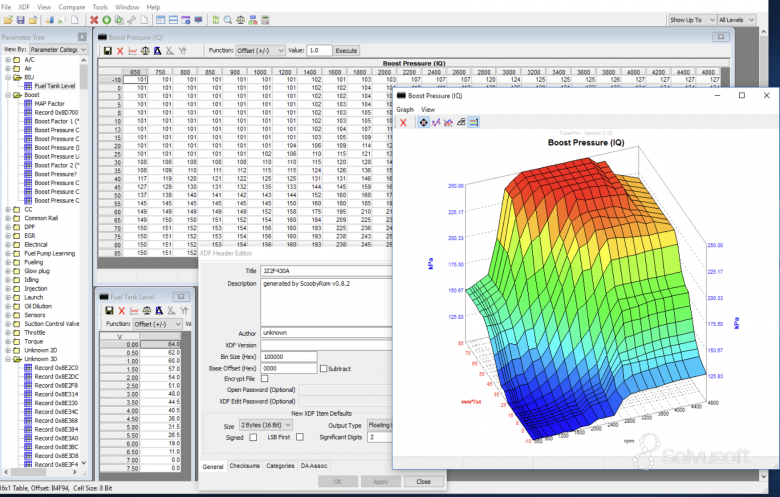
An XDF file defines the structure of a BIN file. It tells TunerPro how to interpret and modify specific addresses and values in the BIN file, which are otherwise just raw hex data.
Specifically, an XDF file does the following:
- Maps human-readable names such as shift maps, torque limits, or RPM points to specific memory addresses in the BIN file.
- Tells TunerPro how to interpret the data, whether it is a single value, a 2D table, a 3D map, or a flag.
- Applies scaling and units so that raw values are displayed correctly. For example, a raw value of 50 in the BIN might represent 5.0ms of injector pulse width.
- Groups and organises parameters to make the tuning process more user-friendly.
Without an XDF file, the BIN file appears as a long list of hex numbers with no structure, making it impossible to tune without already knowing the memory layout by heart.
What Is an ADX File?
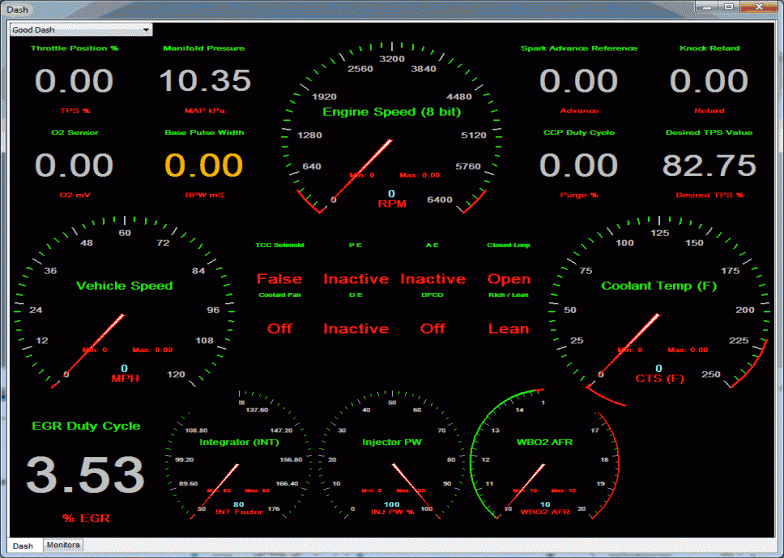
An ADX file defines how real-time data is communicated between TunerPro and the ECU or TCU via a datalogging or tuning interface. Where the XDF file is used for editing the static tune, the ADX file is used for viewing live data from the unit while it is operating.
An ADX file handles the following:
- Defines how to connect to the ECU, including baud rate, data stream format, and the commands required to initiate logging.
- Specifies what data to log, such as RPM, throttle position, coolant temperature, AFR, and boost pressure.
- Tells TunerPro how to interpret incoming data, including which bytes represent which parameters and how to scale and convert them into readable values with correct units.
- Supports dashboards and gauges by mapping logged variables to visual instruments in the TunerPro interface.
Summary
The three file types each serve a distinct purpose and work together as part of the TunerPro workflow:
- BIN -- the actual tune, containing raw calibration data.
- XDF -- the map that explains the BIN file layout and makes it editable.
- ADX -- the setup for logging and viewing live data from the ECU.