If you are working with ECU tuning software like TunerPro, you will quickly come across XDF files. These files are often mentioned alongside BIN files, factory ECU reads and map editing, but the difference between them is not always clear when you are first getting started.
In this blog:
- What Is An XDF File?
- Is An XDF File The Same As A .BIN File?
- What Does An XDF File Do?
- XDF Files And TunerPro
- Where Do You Get XDF Files?
- What Happens If You Do Not Have The Right XDF?
- How Do I Use XDF Files?
- Other ECU File Types: ROM, A2L, DAMOS

What Is An XDF File?
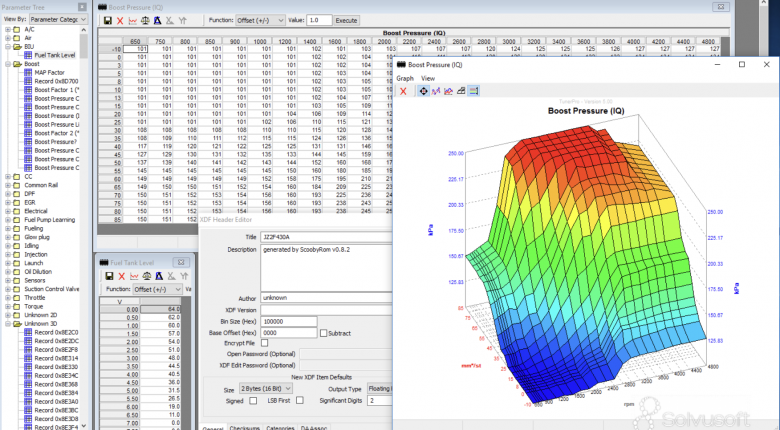
An XDF file (eXtended Definition File) is a type of definition file used by TunerPro. It tells your chosen software how to interpret the raw data inside your ECU (Engine Control Unit) so the information can be displayed as useful tables, maps, switches and parameters rather than unreadable hexadecimal data. Without an XDF, you cannot meaningfully interpret or safely modify the calibration.
Think of the BIN as raw memory, and the XDF as a map legend that tells you what each part of that memory represents.
Is An XDF File The Same As A .BIN File?
No. A .bin file is the raw binary file read from an ECU, TCU (Transmission Control Unit) or another electronic controller. This file contains the calibration data used by the controller, but it is made for a computer to read, not a human.
If you open a .bin file without the correct tools, you will see raw hexadecimal data. Somewhere inside that data may be fuel maps, ignition tables, rev limits, torque management settings, diagnostic trouble code settings and many other parameters, but there is nothing in the file that tells you where those items are located or how they should be scaled.

What Does An XDF File Do?
An XDF file acts as the definition that allows software like TunerPro to understand the .bin file. It tells the software where specific tables and values are located, how the data should be scaled, what units should be shown, and how the information should be displayed to you, the tuner.
For example, the .bin file may contain the raw data for an ignition timing table, but the XDF file tells TunerPro where that table starts, how many rows and columns it has, what the axis values are, and how the raw numbers should be converted into real ignition timing values.
This is why the correct XDF file is so important. A mismatched or inaccurate XDF can display incorrect information, point to the wrong location in the BIN file, or give the tuner a misleading understanding of what they are changing.
XDF Files And TunerPro
XDF is the native definition format used by TunerPro for interpreting BIN files. TunerPro itself does not read and write every ECU directly. In many workflows, a separate tool is used to read the BIN file from the ECU, TunerPro is used to edit the file using the correct XDF, and then another tool is used to write the modified file back to the controller.
This is different from more complete tuning suites where reading, editing, logging and writing may all be handled inside one platform. With TunerPro-based workflows, the process can be very powerful, but it often depends on matching the right BIN file, XDF file, operating system and hardware together. Common examples of read/write tools used alongside TunerPro include PCMflash, MPPS, and BitBox, depending on the ECU and vehicle.

Where Do You Get XDF Files?
XDF files can come from a few different places. Some are created and shared by tuning communities, some are available through public repositories, and others are sold by definition-file providers who build XDF files for specific ECUs, vehicles or operating systems.
For example, MotoBinFiles offers XDF files alongside factory BIN images for a range of motorcycle ECUs. OldSkullTuning also creates customised XDF definition files for TunerPro, including definitions that expose engine and gearbox maps for supported vehicles.
The important point is that an XDF must match the BIN file you are working with. On many ECUs, this means matching the operating system, software version, ECU family and sometimes even the specific file structure. Finding a random XDF for a similar vehicle is not enough.
What Happens If You Do Not Have The Right XDF?
If you do not have a suitable XDF, TunerPro may still be able to open the BIN file, but you will not have a useful way to view or edit the calibration. In practical terms, the BIN file will still exist, but the software will not know where the tuning maps and parameters are.
That is why some tuners start by checking the ECU operating system number before doing anything else. If there is no proven XDF available for that operating system, the next step may be to find a different supported file, use another tuning platform, create a definition from scratch, or use a more advanced calibration development tool.

How Do I Use XDF Files?
The most common XDF-based workflow uses TunerPro. The BIN file is read from the ECU using suitable hardware or software, opened in TunerPro with the matching XDF loaded, edited as required, then saved and written back to the controller. Depending on the ECU, checksum correction may also be needed before the file is safe to flash. TunerPro RT extends this with live data and tracing support on compatible setups.
Universal Patcher is also worth knowing about, particularly for GM PCM workflows. Rather than requiring a pre-built XDF, it can inspect binary files, apply patches, fix checksums and make common calibration edits directly — and can also generate XDF files for use in TunerPro. XDF files generated by Universal Patcher should be verified before use, as with any automatically generated definition. Support is strongest on LS1 and related GM platforms, so confirm compatibility before relying on it for other ECUs.
WinOLS sits in a different category. Where TunerPro relies on an existing XDF to define what is in a BIN, WinOLS is used to find and define maps inside factory ECU files yourself. That makes it essential when no trusted definition file exists, when you need to verify an existing definition, or when you want to understand the calibration structure rather than rely on someone else's interpretation. HPA's WinOLS Mastery: Map Identification & Editing course covers exactly this process using the WinOLS platform, which also offers an XDF import function, though the pricing and complexity of this path is aimed more at commercial users.
Other ECU File Types: ROM, A2L, DAMOS
XDF files are one example of a broader concept in ECU tuning: definition files. The specific names and extensions vary by platform, but the principle is consistent: one file holds the raw ECU data, another tells the software how to interpret it.
Raw ECU data files go by different names depending on the tool or community. BIN and ROM are the most common — though ROM more accurately refers to the memory type rather than the file format — but regardless of the label, this is the file being read, edited and written back to the controller.
The definition side varies too. TunerPro uses XDF files for calibration editing and ADX files for data acquisition and logging. In OEM and professional environments, you will encounter A2L or DAMOS files instead. These serve the same fundamental purpose as an XDF, but are associated with higher-level calibration development workflows rather than community-built definitions.
The names change depending on the platform. The concept does not.

Final Thoughts
An XDF file does not contain the tune itself. The tune data is in the BIN file. The XDF is the definition that tells TunerPro how to make sense of that data.
When the right XDF is matched with the right BIN file, TunerPro can display raw ECU data as usable maps, tables and switches. When the wrong XDF is used, the results can be misleading or dangerous. For basic edits on well-supported platforms, a proven XDF can make TunerPro a very useful tool. For deeper factory ECU work where definitions need to be created or verified, tools like WinOLS become a much more important part of the process.